
Last Updated on October 13, 2026 by Dee
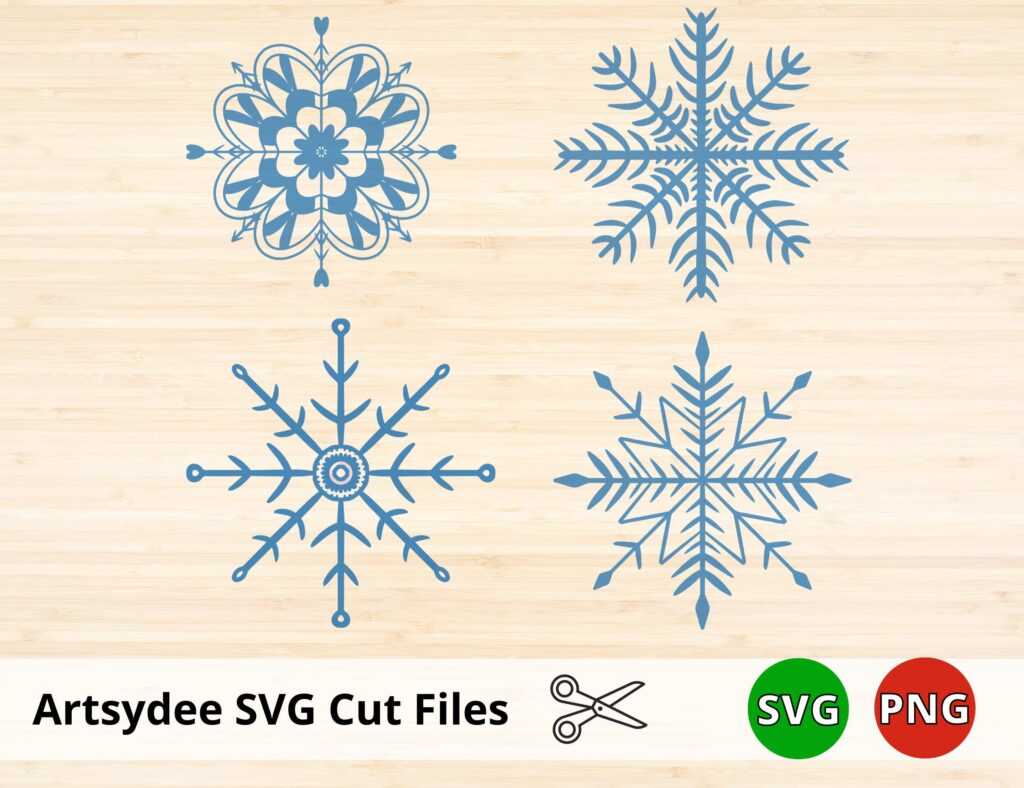
Here are 4 magical snowflake designs for festive winter crafts, free to download as Snowflake SVG files for vinyl cutting and holiday projects.
It’s that time of year again in the Northern hemisphere when the air turns crisp, the leaves start to change color, and the snow starts to fall. With winter upon us, what better way to get into the festive spirit than by creating some beautiful snowflake art?
Download the free Snowflake SVG files at the top of this post!
Table of Contents
4 Magical Snowflake SVG’s

Having fun with your free snowflake SVGs? My shop has more printables and Procreate goodies for your next creative project.
Browse the shop →How to download the Free SVG cut file SVG.
**This page may contain affiliate links to products I have used or recommend. If you purchase something from this page, I may receive a small percentage of the sale at no extra cost to you.**
The zip file containing the SVG files, PNG files, and a DXF file will be available as an instant download for you to extract files immediately.
(This is not a physical product, but rather, digital files that one downloads to access the designs.).
The PNG and SVG file comes with a free commercial use license and can be used freely for personal use, commercial purposes or print-on-demand (POD) designs on t-shirts, hats, and other print or cut projects.
*Digital files for personal use. Do not sell the SVG Files or PNG files as is (as a digital download).
How to Use the Free Snowflake SVG for Vinyl Cutting…
To make your own vinyl Snowflake to stick on a crafting blank (like a tumbler or a T-shirt), you will need the following materials…
-A cutting machine (Cricut, Silhouette)
- Start by downloading the cut files.
- Open the file in your cutting machine software and resize it to fit your project
- Cut out the design on adhesive vinyl using your cutting machine.
- Weed away the excess vinyl around the design
- Apply transfer tape to the design and then peel it off the backing paper.
Creative Craft Idea’s for Using Your Free Snowflake SVG
One of the best things about the holiday season is the lovely festive decorating that goes on.
While store-bought decorations are always an option, there’s something special about taking the time to make your own.
Use one of my free snowflake SVG designs to create custom vinyl decals to adorn your windows, walls, or even holiday gifts. The possibilities are endless!
Here are some quick ideas for Holiday Crafting…

- Design a unique t-shirt or tote bag using the free Snowflake SVG file as your starting point. Add your own text or graphics to create a one-of-a-kind product that will turn heads.
- Create a festive piece of wall art (SVG art) by printing the free SVG file onto canvas or another medium.
- Make some Snowflake stickers!
- Use the snowflake cut file to make customized gift tags or labels. This is a great way to add a personal touch to your holiday gifts.
- Add some snowflakes to your home decor – make a festive banner or garland by cutting out the snowflakes and sticking them to a line of string!
🎨 Want more free printables? Browse my Free Printables Library — over 400 free templates, coloring pages, drawing guides, and creative resources all in one place!

What is an SVG file?
An SVG file, or Scalable Vector Graphic, is a type of image file that allows for vector-based images to be resized without losing quality.
Vectors are ideal for use in design work, as they can be easily scaled up or down without any loss of fidelity.
Additionally, SVG files support transparency and can be animated, making them even more versatile.
SVG files have become increasingly popular in recent years, thanks largely to the proliferation of cutting machines such as the Cricut and Silhouette.
These machines can accurately cut out intricate shapes from paper, vinyl, and other materials, making them perfect for crafting projects.
Other file formats:
A PNG is a “lossless” format with “transparency” (think clear backgrounds).
Check out my Etsy Shop for more beautiful products 🙂
What software do you use to create your own snowflake designs?
If you love these free svg files, you can use Silhouette designer edition of Cricut’s free software (Cricut Design Space) version to make your own SVG files from your uploaded PNGs.
Procreate is my software of choice when it comes to creating digital art and designs.
It’s an app that allows you to draw, paint, and edit photos directly on your iPad.
I love the intuitive interface and the wide range of brushes and colors available.
Plus, the ability to add text and layer images makes it easy to create complex designs.
And if I ever get stuck, plenty of helpful tutorials are available online.
Whether I’m working on a simple sketch or a more detailed painting, Procreate always gives me the results I’m looking for.
One caveat is that you cant make an SVG file directly in Procreate.
However, using the free Inkscape software, you can export your Procreate artwork as a PNG with a transparent background and convert it to an SVG.
You can also use Adobe Illustrator and the Adobe suite to design your artwork and export it as an SVG.
Grab the Free Snowflake SVG’s
👉 Pop your email into the box near the top of this post and I’ll send these straight to your inbox — free!
Love These Freebies? Get Even More Exclusive Creative Goodies on My Patreon! 🎨
If you’re enjoying these free printables, why not join my Artsydee Patreon community? As a member, you’ll gain access to exclusive Procreate tutorials, watercolor lessons, and tons of printables like this one—delivered to you monthly (and sometimes even twice a month!). Plus, you’ll get sneak peeks at upcoming projects and have a say in what content I create next. ✨ Join today and unlock premium resources to take your creativity to the next level!
If you enjoyed this post, you may enjoy these, too…
Free Christmas Wreath SVG for Your Holiday Crafting!
Christmas Tree SVG Free: For Your Festive Crafting
Free Christmas Lights SVG for Your Festive Arts & Crafts
27 Awesome Gifts for Artists Who Draw
Get Crafty with These Free Bird Template Printables
Looking for Awesome Autumn Inspiration? 191 Fall Things to Draw
Free Snowflake SVG: FAQ
How many snowflake SVGs do I get, and are they free?
You get 4 magical snowflake designs, and they’re free to download. Each one comes with a free commercial-use license so you can use them for personal makes or print-on-demand products – you just can’t resell the SVG or PNG files on their own as a digital download.
What’s in the download and how do I get it?
The zip contains the SVG files, PNG files, and a DXF file, ready as an instant download once you unlock the free files in the post. Pop your details in to access the printables, confirm, then refresh the page – after that all the free files across the blog open up for you.
Which machines and materials do I need for vinyl snowflakes?
You’ll want a cutting machine like a Cricut or Silhouette, some adhesive vinyl, and transfer tape. Resize the snowflake in your software, cut it on vinyl, weed away the extra, then use the transfer tape to lift it onto a tumbler, window, or t-shirt. That’s the whole process.
What can I make with the snowflake SVGs?
They’re lovely for winter and holiday crafting – vinyl decals for windows and walls, gift tags and labels, stickers, festive t-shirts and tote bags, or a garland of snowflakes strung along a line. You can also print them onto canvas for simple seasonal wall art.
Why use an SVG instead of a regular image?
An SVG is a vector, so it scales up or down to any size without losing sharpness – perfect for cutting machines that need clean edges. It also supports transparency, meaning no white background box around your snowflake. Ordinary PNGs and JPGs blur when you enlarge them, which is why SVGs win for cut projects.
Where can I find more resources like this?
If you love these freebies, Dee’s Patreon community is where the deeper stuff lives – exclusive Procreate tutorials, watercolour lessons, and fresh printables delivered every month. You can take a look at patreon.com/Artsydee. The blog’s free printables library is a lovely place to browse too.
Can I make my own snowflake designs?
Yes – Dee designs hers in Procreate on the iPad, then exports each one as a transparent PNG. Because Procreate can’t export SVGs directly, you convert that PNG into an SVG using free software like Inkscape, or with Adobe Illustrator if you have it. From there it’s ready for your cutting machine.
If these four snowflakes sparked a winter craft session, you’ll find more printable designs and Procreate tools in my shop. It’s the perfect place to keep the creativity going.
Visit the Artsydee shop →