
Last Updated on October 10, 2026 by Dee
If you’ve been searching for a way to add some rose-filled beauty to your works of art, look no further than the Rose Brush Procreate stamp set.
With over 21 hand-drawn stamps in this collection, you will have an abundance of unique roses at your fingertips. Whether you’re working with digital or traditional mediums, these refined and dimensional illustrations are perfect for adding detail and style to your artwork.
So grab that brush and get ready to experience the romance of these stunning rose designs!
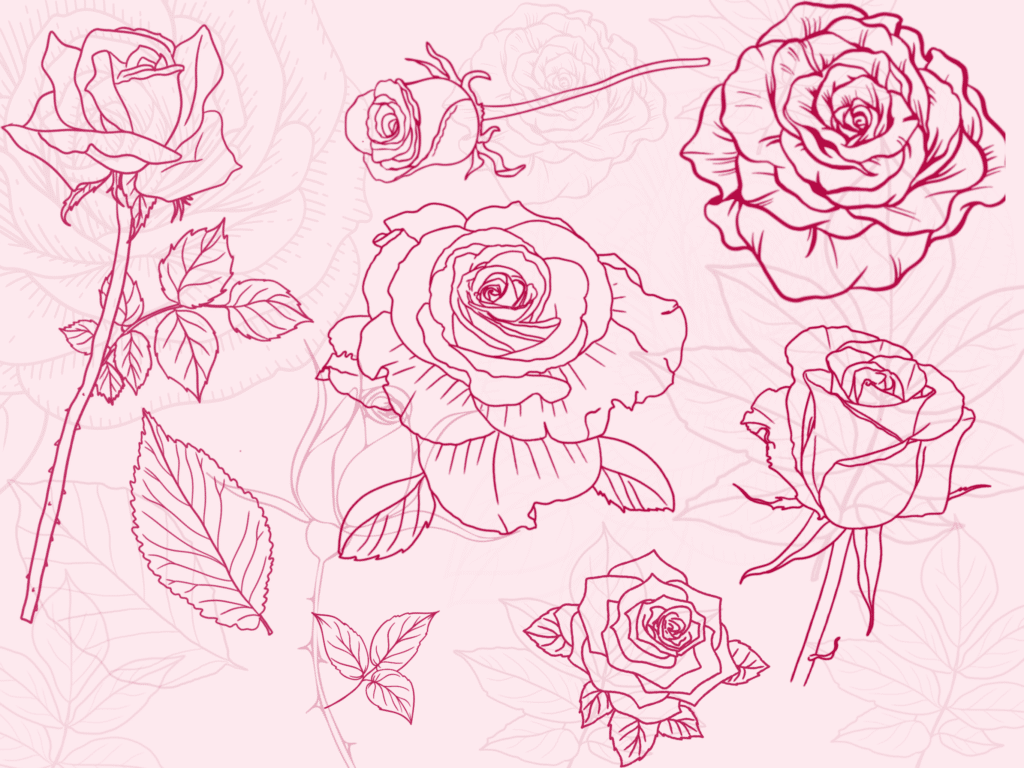
Rose Brush Procreate: 21 Hand-Drawn Roses
Bring a touch of timeless elegance to your digital art with these beautifully hand-drawn Roses Procreate Stamps!
Unleash your creativity and add floral charm to your paintings, drawings, and designs. This Procreate brush set includes Single Roses, Rosebuds, Rose Heads, and Roses with Stems, perfect for creating breathtaking botanical compositions.
With just a few taps, you can bring the beauty of nature to life in your digital art. Download the Procreate brushes, open them in Procreate on your iPad, and start creating some floral magic.
The brush set is saved as 21 stamps, making it easy to overlay and adjust to your liking. You have complete control over the opacity and size and can choose any color to match your creative vision.
Get ready to elevate your digital art with these gorgeous Roses Procreate Stamps.
What does this stamp set include?
Your purchase includes one Procreate Brushset of Roses Stamps, available for download as a Procreate Brushes file. Let the creative magic begin!
Procreate Rose Stamps are a set of 21 beautifully hand-drawn stamps featuring roses, rosebuds, rose heads, and roses with stems.
These stamps can be used to add a touch of elegance and botanical beauty to your digital artworks, paintings, and designs.
***Please note these brushes are only compatible with the Procreate app and will not work with other programs or the Procreate pocket app.
We ask that you respect the copyright and not share or distribute these brushes as a standalone file.
Use them to enhance your digital art and inspire others to create their masterpieces.
How to Use Procreate Stamps
Procreate stamps give even the most amateur artist a creative edge! With Procreate stamps, you can easily turn ordinary art into something extraordinary.
Using this feature couldn’t be easier – simply select a stamp to overlay onto your masterpiece.
Once you have chosen your stamp shape, tap on the screen with your Apple pencil or finger.
The stamp will be added to your canvas, and you can adjust the opacity, size, and color as you desire.
Floral brushes and stamps have never been easier to use!
With such a variety of designs, textures, patterns, and whimsical illustrations, you’ll find so many ways to add beautiful elements to your art. Make sure to experiment and have fun – that’s what Procreate is all about. Who knew creating art could be so effortless 😉
Art Project Ideas for Using Rose Stamps
For creative crafters, rose stamps in Procreate are a dream come true!
You can use them for so many fun projects. Some ideas include making greeting cards, scrapbooks, and posters where you can create a background landscape with roses scattered around it.
You can also use these stamps for bespoke tattoo designs, wedding invitations, and even for creating your own fashion prints.
You could also make unique tags and labels to add to handmade gifts. The possibilities are truly endless!
Your artful imagination can run wild with a combination of rose stamps and Procreate’s brushes and blend modes.
How to Color Roses in Procreate
Color drop lets you quickly fill the shape of this floral icon with any color of your choice.
Or, for a more hands-on approach, choose from a variety of brushes to manually apply any hue you desire to the rose flower Procreate Stamp.
Don’t forget to create a new layer beneath the stamp before coloring — this will keep the outline visible and help your rose stand out from its background.
With just a few clicks and colorful creation, you’ll have beautiful roses unique to your art that express your style.
Why are Procreate Stamps so fabulous?
Procreate stamps have revolutionized the way digital artists draw and design.
Not only do procreate stamp brushes provide dynamic shapes to incorporate into a drawing or design, but they also eliminate unnecessary time spent creating those same shapes from scratch.
Added bonus: you can unlock creativity by using various shapes that you may not have thought to use in your artwork before!
Procreate flower brushes can take a design to the next level, allowing artists to add intricate details and interesting textures quickly and easily – leaving more time for creating unique designs.
They are an invaluable tool that digital artists should have in their arsenal!
Flower Stamps are a convenient and time-saving tool for digital artists. With just a few taps, you can quickly and easily add beautiful roses to your artwork, making it easier to bring your creative vision to life.
Why is Procreate so great?
If you’re looking for an all-inclusive digital sketching and painting app, Procreate is the way to go. It’s packed with a variety of advanced features that make creating art easy and enjoyable.
From the customizable brush engine, which allows you to mix and match different brush textures for unique effects, to the Layer Blend Modes, which offer up cool color options and depth tools, Procreate makes it simple to unleash your creativity.
And when you combine these powerful tools with its smooth user interface, stunning zoom capabilities, time-saving shortcuts, and impressive video export options, it’s no wonder why Procreate is among the favorite applications used by many professional artists from all around the world.
Conclusion
The Rose Brush Procreate stamp set is a great way to add some rose-filled beauty to your works of art. With over 21 hand-drawn stamps in this collection, you will have an abundance of unique roses at your fingertips.
Whether you’re working with digital or traditional mediums, these refined and dimensional illustrations are perfect for adding detail and style to your artwork. So grab that brush and get ready to experience the romance of these stunning rose designs 😉
Other articles you might find helpful…
20 Beautiful Hand-Drawn Procreate Leaf Brush Stamps
Get Groovy with a Procreate 70s Color Palette
How to Crop in Procreate: Procreate Editing 101
Rose Brush Procreate Stamps: FAQ
What’s included in the Rose Brush Procreate stamp set?
You get one Procreate brush set with 21 hand-drawn rose stamps — single roses, rosebuds, rose heads, and roses with stems. It downloads as a Procreate Brushes file, ready to open on your iPad. That variety gives you plenty to build botanical compositions with.
Do these rose stamps work in any art app?
No — they’re made specifically for the Procreate app and won’t work in other programs or in Procreate Pocket. Once you’ve downloaded the file, you open it in Procreate on your iPad and the stamps load straight in. From there they behave like any other brush.
How do I use a Procreate stamp?
It couldn’t be simpler. Pick the stamp you want, then tap the canvas with your Apple Pencil or finger and the rose drops right in. You can adjust its size, opacity, and colour to fit your piece. That’s the beauty of stamps — instant detail without drawing it from scratch.
How do I colour the roses?
You’ve got two easy routes. Use ColorDrop to fill the shape with any colour in one tap, or grab a brush and paint the hue in by hand for more control. Either way, add a new layer beneath the stamp before you colour — it keeps the outline crisp and helps the rose stand out from the background.
What can I make with rose stamps?
All sorts. They’re lovely for greeting cards, scrapbook pages, and posters with roses scattered through a background. People also use them for tattoo designs, wedding invitations, fashion prints, and tags for handmade gifts. Once you start combining them with Procreate’s brushes and blend modes, the ideas keep coming.
Can I resize the stamps without losing quality?
Yes — because they’re saved as stamps, you’ve got full control over size and opacity, so you can scale them up or down to suit your layout. Overlay a few at different sizes to build depth. Just experiment freely; nothing’s permanent while you’re working on separate layers.
Can I share or resell the brush file?
Please don’t share or distribute the brushes as a standalone file — that’s the one thing the licence asks you to respect. Use them to make your own art and designs as much as you like, but the file itself stays with you. It keeps things fair for everyone who’s bought the set.